Author: alisonsoong

iPhone 7

iPhone 7

The new iPhone 7 has many new features (including its HUGE size!):

  • splash/water resistant
  • new home button (it’s not really a button… psyche!)
  • two sizes; 4.7-inch and 5.5-inch
  • Optical zoom = 2x
  • Digital zoom = 10x
  • portrait mode
  • 25% brighter
  • 3D touch
  • 2 times faster than iPhone 6
  • very long battery life
  • 2 times louder than iPhone 6
  • No more earphone jack (worst feature yet)

The new portrait mode is so wonderful. Ever need a photo for your holiday card? Just use portrait mode on an iPhone 7, and you’re covered. Here’s a tip: find a cool multicolor background because this mode blurs the background. For example, in the fall, you can find a tree that has orange, yellow, and red leaves and use that for your background. Trust me, it looks awesome.

The most horrible part is that there is no more earphone jack. So if you just bought super expensive earphones, do this: bye a converter. Here is an apple link for a converter so you can use your comfy earphones—-—–.

The New MacBook Pro

The New MacBook Pro

Okay. This is the most awesome computer ever. The touchbar is amazing!  Before I go crazy with my praise, here are the features of the new MacBook Pro:

  • 67% brighter screen
  • about 17% thinner
  • about 130% faster graphics
  • about 10 hours of battery
  • 67% higher contrast ratio
  • Up to 58% more volume
  • 2x dynamic range
  • TOUCHBAR!!!

It is the best computer that I have ever encountered in my life. Even though the keyboard may be hard to type with at first, you get used to it. This post was written with a MacBook Pro! (the new one with the touchbar). Also, you can finally use emojis!!!!! The only letdown is that you cannot use touchbar features in chrome; you can only use them in safari. In my opinion, this computer gets a 5/5. Actually, it gets a 100/10!!! (that is how much I love this computer!😝)


Microsoft HoloLens

Microsoft HoloLens

Microsoft claims that “Holograms are the next evolution in computing”. They call their HoloLens a holographic computer. The features of the HoloLens are:

  • it is comfortable: weight is distributed evenly
  • it is adjustable to fit: an adjustable wheel allows you to adjust the size to fit your head
  • it has power and grace: no wires, external cameras, contains more power than an average laptop, and it doesn’t need a fan
  • it has sensors: it can understand the area and things around you
  • it has built in speakers: it’s audio is immersive, without headphones
  • it has “advanced optics”: it generates multi-dimensional full-color images
  • it understands gestures: uses a custom holographic processing unit

The Development Edition costs $3,000 if you buy it from Microsoft, and it costs $ 3,799 for the Development Edition if you buy it from Amazon. On Amazon, 8 people have rated the HoloLens so far. Right now, the rating is 3.9 stars out of 5, which in my opinion, is very bad. The reason why is because only 8 people rated it! The best products should have at least 100 or more ratings (most ratings should praise the product too). If there are more good ratings on a product, then there is a good reason why people bought it! I would never buy the HoloLens. Why? Because it costs so much money! Even though it is very cool, I don’t think that I would spend 3,000 dollars to try it and own it. HoloLens might be perfect for someone with a creative job (like animator). I actually hope that I can try the HoloLens one day, so I can write more about it’s functions! If you have any knowledge of what it can do (that is not listed in this blog), please let me know through the comments section.

Here is the link to the HoloLens page in the Microsoft website –https://www.microsoft.com/microsoft-hololens/en-us

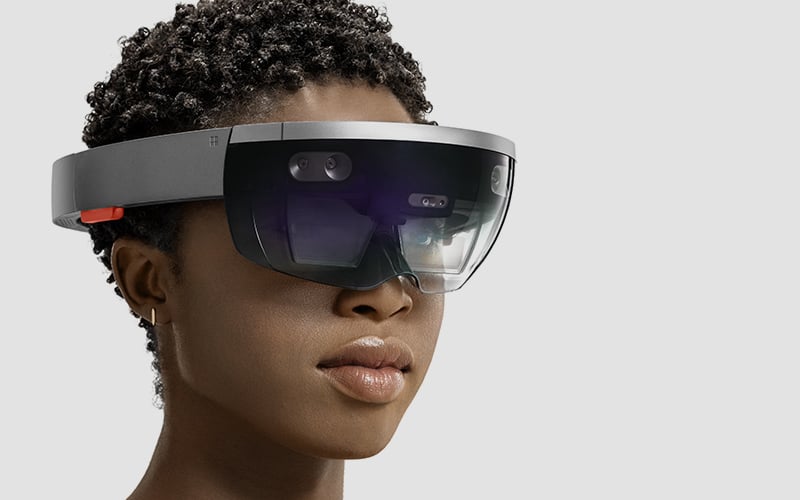
Portrait of woman wearing HoloLens

Photo by Microsoft
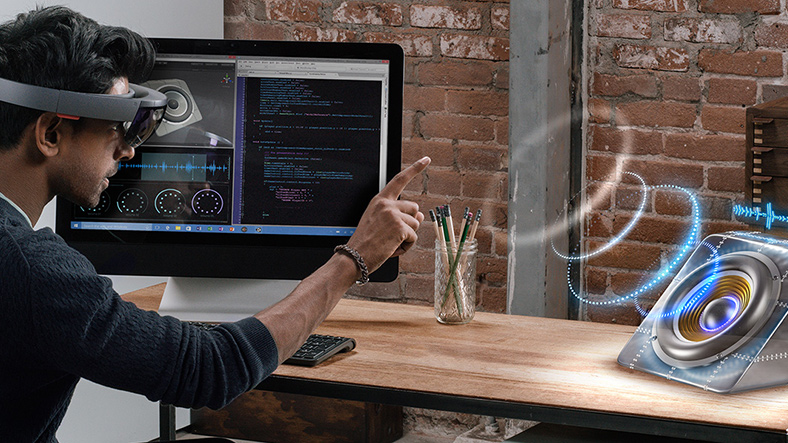
Man wearing HoloLens with code editor open on his monitor, interacts with a speaker hologram on his desk
Photo by Microsoft
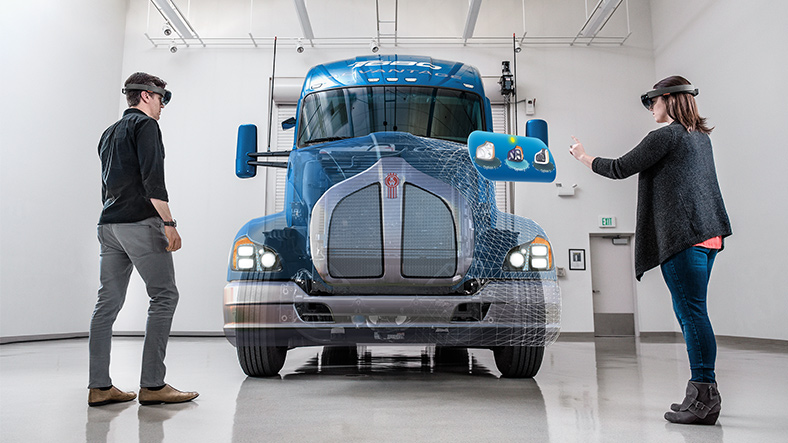
Man and woman wearing HoloLenses and working on a holographic truck body overlayed on a real truck frame

Photo by Microsoft

Featured photo by Microsoft

The Apple Watch, Series 2

The Apple Watch, Series 2

Apple has just recently released the Apple Watch, Series 2. This Apple Watch has some major improvements that makes it way better than the first Apple Watch series that Apple released. Some of these improvements are:

  • Built-in GPS.
  • Water resistance to 50 meters.
  • A new lightning-fast dual-core processor.
  • a display that’s two times brighter than before.

It was designed by Apple for athletic activities, like running, swimming, etc. Apple calls this second series the “Superior Sports Watch” because it has built-in GPS, a heart rate sensor, is water resistant for 50 Meters, and has a comprehensive workout app. Apple also calls is the “Advanced Activity Tracker”, the “All-Day Assistant”, and the “Powerful Health Tool”.

There are different types of watches in the second series. There is the regular Apple Watch, the Nike Apple Watch, the Hermēs Apple Watch, and the Apple Watch Addition.

The Apple team made this series of Apple Watches water resistant by using the speakers to push water out. In the first series of Apple Watches, water would get inside of the watch through the speakers (since the speakers need a hole so sound waves can flow out) and would damage the watch.

Bonus Content 🙂  : Do you ever find yourself having too many wires at your “charging station”? Here are products that can minimize your wires!

Product 1

Product 2


featured photo by Target

The Chromebook

The Chromebook

The Chromebook is a fast and reliable computer, with all of the google applications built-in. You never have to worry about losing your work because all of it gets saved into your google drive, automatically. Virus protection is also built-in, so you can do more on the Chromebook, without having to worry much about viruses.

There are many different kinds of Chromebooks. It might be hard to pick which one to buy. Acer, AOPEN, ASUS, Dell, HP, Lenovo and LG, are the companies who make all of the Chromebooks, and they all have differences in appearances and sizes.

All of the Chromebooks have touch screens, and one of the Chromebooks, the ASUS Chromebook Flip, can have the screen flipped back(like a tablet). Even thought some Chromebooks are pretty expensive, Google advertises it as a good investment. Also, Google claims that teachers, businesses, and everyday people have said that they, “Get more done and worry less.” with a Chromebook.

As great as Chromebooks seem, they have some major setbacks that may discourage you from buying one. 1) It’s a goldmine for hackers, says an expert at software security firm Kaspersky. 2) You cannot use all of the applications that you can on an Apple computer (ex. Adobe Photoshop). 3) They are more expensive than they need to be, according to lots of bloggers.

Chromebook ratings are around 4 1/2 starsScreen Shot 2015-12-06 at 9.58.56 AM, with averaged 456 people.

Click here for the Chromebook Website.

(Featured Picture – HP Chromebook 14 G3, description: sleek and colorful. Photo by Google)

(other pictures – photos by Google)